

Key Updates: Fault Tolerance & Agentic AI
A fault-tolerance engine and a new Quantum Engineering interface
7 Enhancements
Block encodings, batched observables, optimized arithmetic, and more
6 Documentation & Library Additions
Fault-tolerance and block-encoding guides, a revamped Qmod tutorial
11 Bug Fixes & Deprecations
Correctness fixes, deprecations, and breaking changes
Fault-Tolerance Engine
Classiq’s new fault-tolerance engine sheds light on what a fault-tolerant quantum program would actually cost to run on error-corrected hardware. It routes a synthesized program, whether you wrote it in Qmod, took a ready-made example from the Classiq Library, or built it with the new Quantum Engineering interface, onto a surface-code lattice, and estimates the total logical error of the whole computation at each code distance you choose. Because it works from a concrete lattice-surgery plan, the estimate includes costs that gate counts miss, such as idle steps and long CNOT paths.Choosing a Noise Model and Routing
The engine first needs a logical noise model, which gives the error rate of each error-corrected operation, such as an idle step, a CNOT, or a T gate, as a function of the code distance. Load a precomputed public model, such as the genericpublic/depolarize_1e-3 or the illustrative public/google_willow_like and public/ibm_heron_r2_like, or simulate one from the physical error rates of your device of choice.
Next, transpile the program to Clifford+T with export, setting the maximum total approximation error allowed for its rotations, and pass the result to route_circuit, which places each logical qubit on a surface-code patch and schedules every operation as lattice surgery, including the magic-state cultivation each T gate needs.
Visualizing the Routed Program
view_program renders the routed plan as an interactive 3D page, with the grid of patches on the horizontal axes and time, in cycles, on the vertical axis.
An example routed program:Estimating the Total Logical Error
Finally,estimate_total_errors combines the routed program with the logical noise model and returns the estimated total logical error, 1 - fidelity, at each code distance you pass.
public/depolarize_1e-3 noise model gives these results:
The tutorial counts physical qubits from the routed layout: 2d² − 1 for each surface-code patch, plus 2d + 1 for each boundary strip that joins neighboring patches (d is the code distance).
For a full walkthrough, refer to the Error Correction user guides and SDK reference.
Quantum Engineering Interface
The new agentic Quantum Engineering interface, accessible via the Classiq web platform, lets you create quantum algorithms and applications alongside the meticulously crafted Quantum Engineer agent, leveraging the full Classiq stack. You set the goal in natural language, or attach a paper, a circuit image, or a code file, and the agent proposes a plan and works through it with you: designing the algorithm, writing the Qmod model, synthesizing it into a quantum program, executing it, and analyzing the results, all in one thread. Each step produces an interactive artifact you can open, review, and build on: the Qmod code, the quantum program visualizer, the execution results, and an analysis report.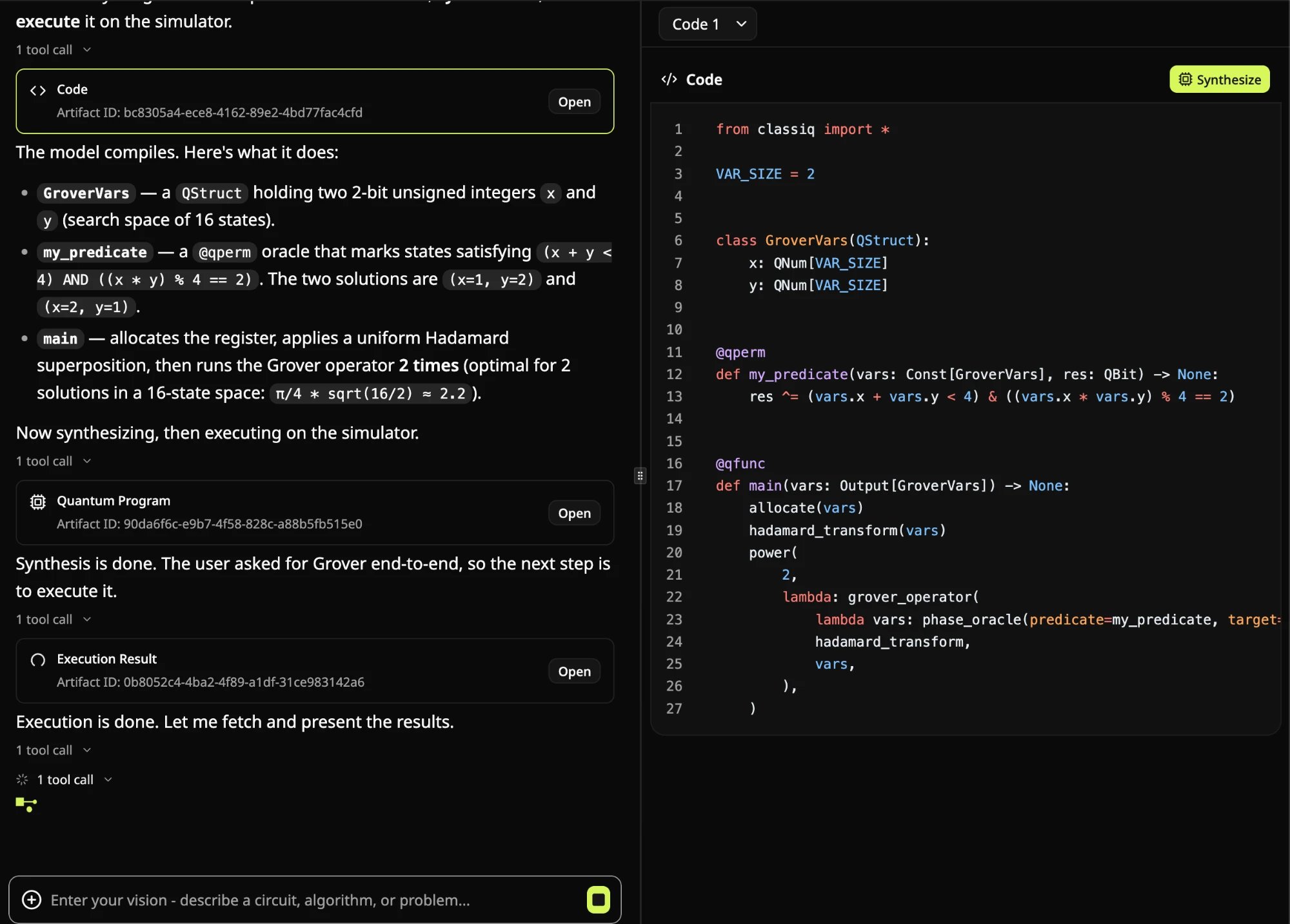
The agent explaining a generated Grover model, with the Code artifact open alongside the chat.
One AI Layer, Two Entry Points
Unlike a general-purpose coding agent on its own, the Quantum Engineer is built on the Classiq AI layer: skills, tools, and MCP capabilities that integrate directly with the full Classiq API. It is this layer that gives the Quantum Engineer agent its edge; every step harnesses Classiq’s own core technology, and its skills are grounded in the Classiq knowledge base and continuously evaluated against rigorous internal benchmarks. The interface is one of two ways into this layer. The other is the Quantum Engineer plugin, which brings it into agentic coding platforms such as Claude Code, Cursor, Codex, and Copilot. The Quantum Engineer plugin is available as a zip file under More from Classiq in the interface sidebar. To install it, follow the installation steps in the user guide, or ask your coding agent to do it for you.Enhancements
Composable Block Encodings
The newBlockEncoding class turns block encodings, the primitive underneath QSVT, qubitization, and Hamiltonian simulation, into objects you can combine just like the matrices they encode. Each block encoding carries its scaling factor, number of block qubits, and approximation error, and every sum, product, or other composition returns a new encoding with these already computed, so you don’t need to work out the block sizes or scaling factors yourself.
- Create an encoding: From a dense matrix (optionally with the FABLE algorithm), a sparse Pauli operator (encoded by default with the new
unary_selectopen library function), or constant diagonals. - Combine encodings: Add, multiply, scale, or take tensor products of encodings to get an encoding of the sum, product, scaled matrix, or tensor product of the encoded matrices. A single encoding can also be turned into an encoding of the inverse matrix or into its qubitized walk operator.
- Check the implemented matrix:
to_matrixreconstructs the encoded matrix by simulation, up to a global phase, so you can compare it with the matrix you expect.
Faster Batched Observable Estimation
observe now accepts a list of observables and evaluates them in a single call, instead of one call per observable. Before execution, each observable is split into groups of terms that can be measured together, and groups that need the same measurement basis share one sampling run, so the number of circuit executions drops sharply. The Adapt-QAOA, Adapt-VQE, and Fermi-Hubbard notebooks now use batched observables, with these observed speedups:
For Fermi-Hubbard, this reduces the cost that had kept larger 1D and 2D instances out of reach. Because observables may now share a sampling run, their expectation values can be correlated rather than independently sampled. For details, see Batch of observables.
Observable estimation also gains two smaller improvements:
ExecutionSession.observeandExecutionSession.submit_observenow take anestimateargument, matching the standaloneobserve. Passestimate=Falseon the Classiq simulator to compute the exact expectation value from the state vector, free of shot noise, for noiseless programs of up to 26 qubits.- An observable can now act on fewer qubits than the program, and is automatically padded with identities on the remaining qubits.
Optimized Comparisons and Increments
Two of the most common arithmetic operations in Qmod, comparing a quantum number against a constant and incrementing it by 1, now use dedicated primitives. Each has several variants that trade auxiliary qubits against gate count, and the compiler picks the one that fits your optimization parameter and amax_width constraint, if you set one.
- Constant comparisons: Comparisons with
<,<=,>, or>=, such asx < 5, no longer need an auxiliary quantum variable as wide as the operand:- Optimizing for width (the default): The comparison uses no auxiliary qubits.
- Optimizing for CX count: The comparison uses auxiliary qubits to keep its CX count growing linearly with the operand’s width, instead of quadratically as in the auxiliary-free variant. In addition, under a
control, each control qubit adds only 6 CX gates.
- Increment by 1: For an in-place increment or decrement by 1 (
x += 1,x += -1), including inside acontrolblock, optimizing for width selects a QFT-based variant with no auxiliary qubits, and optimizing for CX count selects a fault-tolerant, Toffoli-based variant with far fewer CX gates. The Discrete Quantum Walk tutorial now compares the new increment with a hand-built one.
Earlier Qubit Release in Uncomputation
Automatic uncomputation now releases auxiliary qubits as early as possible, reducing the width of the synthesized quantum program. This applies when the optimization parameter iswidth or left unset (the default). Models optimized for depth or gate count, and programs synthesized with compatibility_mode=True, are left unaffected. Releasing qubits earlier can require recomputing intermediate values later, so depth and two-qubit gate count may grow for some models.
Upgraded Quantum Layer for QNNs
The quantum layer for training hybrid quantum neural networks gets two upgrades:QLayernow builds the new, faster quantum layer, previously available only asQLayerV2. Passobservables=...to output expectation values, or use the newreadoutargument withSamplingReadoutto sample the program and apply your own post-processing. The older call forms still build the classicQLayerV1, which is now deprecated, as described in Deprecations below.- The layer trains in any environment where the SDK runs, not only in Classiq Studio. In Studio, it runs on the in-process simulator for circuits of up to 26 qubits, up from 12, and computes exact gradients for expectation-value outputs. Outside Studio, it runs the circuits on an execution backend instead.
State Vectors of Up to 24 Qubits
calculate_state_vector on the Classiq simulator (classiq/simulator) and the NVIDIA simulator (classiq/nvidia_simulator) now returns state vectors of up to 24 unfiltered qubits, up from 18. Update to SDK 1.31.0 or later to use it. Large state vectors take time to download and need several GB of memory from 22 qubits up, so filter variables or set an amplitude threshold where you can.
Parsing Results from Other Platforms
The newparse_sample_result(qprog, counts) function turns a raw bitstring histogram into the same DataFrame format that sample returns. Use it when you run an exported circuit elsewhere, such as on an external simulator or on hardware, and want to bring the results back into Classiq. For CUDA-Q-style bitstrings, pass bit_order=BitOrder.QUBIT_ZERO_LEFT, or use parse_cudaq_result, which applies that setting for you.
Documentation Additions
- Quantum Engineering Interface Guide: Covers how to open the new web interface, run a task from idea to analyzed results in a single thread, work with the artifacts each step produces, and write effective prompts, expanding on the Quantum Engineering Interface section above.
- Fault-Tolerance Engine Guides: Six pages covering every aspect of the engine, from publicly available and custom noise models to routing, visualization, and total-error estimation, complemented by an end-to-end tutorial notebook listed under Library Additions below. For a quick tour of the workflow, see the Fault-Tolerance Engine section above.
-
Block Encoding Guides: Three pages introducing the new
BlockEncodingclass. Constructing Block Encodings covers building block encodings from a dense matrix, a sparse Pauli operator, or constant diagonals, and Composing Block Encodings covers combining them and verifying the result, expanding on the example in the Composable Block Encodings section above. - Revamped Qmod Tutorial: The two-part, hands-on Qmod tutorial was rewritten from the ground up, as part of a broader revision of Classiq’s tutorials, with new tutorials on the way. Part I covers the language foundations, from quantum variables and types to arithmetic and control, and Part II covers the statements and operators used to express real quantum algorithms, from phase statements to hybrid execution.
Library Additions
- Fault-Tolerance Engine: End-to-End Tutorial: Walks you through the full fault-tolerance workflow step by step; it starts from a synthesized quantum program transpiled to Clifford+T, moves through noise-model selection, routing onto the surface-code lattice, and visualization, and ends with the estimated total logical error and physical-qubit count at each code distance.
-
Block-Encoding Notebooks Revisited: Thirteen library notebooks now use the new
BlockEncodingclass, including QSVT matrix inversion, VQLS with LCU, Hamiltonian simulation with QSVT, GQSP, and qubitization, the quantum linear solvers for CFD, and the Vlasov-Ampère and cooling systems optimization applications.
Bug Fixes
- Uncomputation keeps rolled loops and
skip_controlbodies: Automatic uncomputation now preserves a rolledrepeatorforeachloop, or askip_controlbody, in a function that has a variable to uncompute. powerandinverthandlerepeatandforeachloops correctly:powernow raises the whole loop to the power, where it previously raised each iteration to the power separately, andinvertnow reverses the iteration order, where it previously kept the original order.- Output variable names can match result column names: An output variable of
maincan now share a name with a column of the result DataFrame. In case of a name clash with a built-in column, such asphaseincalculate_state_vector, your variable keeps its name, the built-in column is renamed toresult_<name>, and a warning is issued.
Deprecations
observableparameter renamed toobservablesinobserve: The second parameter of the standaloneobservefunction is now namedobservables, and it also accepts a list, as covered in the Faster Batched Observable Estimation section above. Calls that use the old keyword,observable=..., raise aTypeError; useobservables=...instead, or pass the argument without a keyword.hamiltonianparameter deprecated in favor ofobservablesinExecutionSession: The session’sobserveandsubmit_observenow also takeobservables, which accepts a single observable or a list. Calls that use the old keyword,hamiltonian=..., still run with a deprecation warning, andhamiltonianwill be removed in an upcoming release. For details, see the dedicated section of theobserveuser guide.ExecutionSessionestimate aliases removed: The deprecatedExecutionSessionaliasesestimate,submit_estimate,batch_estimate, andsubmit_batch_estimatehave been removed. Use the session’sobserveorsubmit_observeinstead, passing a list of parameter dicts for batched execution.QLayernow buildsQLayerV2, andQLayerV1is deprecated: CallingQLayerwith theobservablesorreadoutkeyword arguments now builds the newQLayerV2. The older call forms,QLayer(qprog, post_process, ...)andQLayer(qprog, execute, post_process, ...), still build the classicQLayerV1, now with a deprecation warning.QLayerV1will be removed in a future release.- Qubit-layout check extended to
control,invert, and function bodies: A quantum variable must now end acontrolorinvertblock (or a function body) with the same qubit layout it started with, extending the check added in July forpower,repeat,foreach, andifblocks. Programs that break this raise an error. To avoid the error, usebindto re-join the variable’s parts in their original order, as described in Qubit Layout Stability. inplace_binary_to_one_hotin-out parameter split intosourceandtarget: The open library functioninplace_binary_to_one_hotnow takes separate input and output parameters (source: Input[QArray],target: Output[QArray]) instead of a single in-out array parameter.- Run via Classiq restricted and emulation paused on Azure Quantum: Run via Classiq is no longer available for Azure Quantum backends in the IDE, for both execution and benchmarking. The SDK also rejects it for Azure QPUs and for all Quantinuum targets, so pass your own Azure Quantum credentials to run on them. In addition, emulation on Azure is temporarily unavailable; to simulate IonQ hardware noise, use the IonQ provider’s
emulateoption instead. - C12 backend preference field
ininoisyrenamed toininoise: TheC12BackendPreferencesfield now matches the C12 Callisto API. The old name is ignored without an error, so replaceininoisywithininoisein any code that sets it.