


View on GitHub
Open this notebook in GitHub to run it yourself
# TODO is there for you to do yourself.
**The # Solution start and # Solution end are only for helping you.
Try doing it yourself…**
Solving linear equations appears in many research, engineering, and design fields.
For example, many physical and financial models, from fluid dynamics to portfolio optimization, are described by partial differential equations, which are typically treated by numerical schemes, most of which are eventually transformed to a set of linear equations.
The HHL algorithm [1] is a quantum algorithm for solving a set of linear equations. It is one of the fundamental quantum algorithms that is expected to give a speedup over its classical counterpart.
A set of linear equations of size is represented by an matrix and a vector of size , , where the solution to the problem is designated by the solution variable .
For simplicity, the demo below treats a usecase where is a normalized vector , and is an Hermitian matrix of size , whose eigenvalues are in the interval .
Generalizations to other usecases are discussed at the end of this demo.
- Defining a Specific Problem
Output:
- Building Simple HHL with Classiq
2.1 Define The Model
This tutorial gives instructions on building an HHL algorithm and presents the theory of the algorithm. The algorithm consists of 4 steps:- State preparation of the RHS vector .
- QPE for the unitary matrix , which encodes eigenvalues on a quantum register of size .
- An inversion algorithm that loads amplitudes according to the inverse of the eigenvalue registers.
- An inverse QPE with the parameters in (2).
2.1.1 State Preparation for the Vector
The first stage of the HHL algorithm is to load the normalized RHS vector into a quantum register: where are states in the computational basis. Comments:- The relevant built-in function is the
prepare_amplitudesone, which gets values of , as well as an upper bound for its functional error through theboundparameter.
aer_simulator_statevector as backend, with one shot
Refer to Execution Preferences documentation and to Classiq backends documentation
Output:
Output:
2.1.2 Quantum Phase Estimation (QPE) for the Hamiltonian Evolution
The QPE function block, which is at the heart of the HHL algorithm, operates as follows: Unitary matrices have eigenvalues of norm 1, and thus are of the form , with . For a quantum state , prepared in an eigenvalue of some unitary matrix of size , the QPE algorithm encodes the corresponding eigenvalue into a quantum register: where is the precision of the binary representation of , with being the state of the -th qubit. In the HHL algorithm a QPE for the unitary is applied. The mathematics: First, note that the eigenvectors of are the ones of the matrix , and that the corresponding eigenvalues defined for are the eigenvalues of . Second, represent the prepared state in the basis given by the eigenvalues of . This is merely a mathematical transformation; with no algorithmic considerations here. If the eigenbasis of is given by the set , then Applying the QPE stage gives Comments:- Use the built-in
qpefunction.
2.1.3 Eigenvalue Inversion
The next step in the HHL algorithm is to pass the inverse of the eigenvalue registers into their amplitudes, using the Amplitude Loading (AL) construct. Given a function , it implements . For the HHL algorithm, apply an AL with where is a lower bound for the minimal eigenvalue of . Applying this AL gives where is a normalization coefficient. The normalization coefficient , which guarantees that the amplitudes are normalized, can be taken as the lower possible eigenvalue that can be resolved with the QPE: The built-in construct to define an amplitude loading is theassign_amplitude_table function.
2.1.4 Inverse QPE
As the final step in the HHL model, clean the QPE register by applying an inverse-QPE. (Note that it is not guaranteed that this register is completely cleaned; namely, that all the qubits in the QPE register return to zero after the inverse-QPE. Generically they are all zero with very high probability). In this model we will simply call the QPE function with the same parameters in stage- This is how the quantum state looks now
2.1.5 Putting it all together
Let’s remind that the entire HHL algorithm is composed of:- State preparation of the RHS vector .
- QPE for the unitary matrix , which encodes eigenvalues on a quantum register of size .
- An inversion algorithm that loads amplitudes according to the inverse of the eigenvalue registers.
- An inverse QPE with the parameters in (2).
my_hhl function
You can apply QPE\dagger * EigenValInv * QPE using the within_apply operator
main function.
Since you already have done all the job in my_hhl function, all we have to do now is to call it with the relevant inputs
Call my_hhl with QPE_SIZE digits resolution, on the normalized b, where the unitary is based on unitary_mat.
2.2 Add Execution Preferences
Once we have a modelqmod_hhl (by creating it from main), we would like to add execution details to prepare for the program execution stage.
2.2 Synthesize - from qmod to qprog
Once we have a high level model, we would like to compile and get the actual quantum program. This is done using thesynthesize command.
Output:
qprog as depth for example, can be seen both in IDE and in Python SDK
Output:
Output:
2.3 Execution
Here we execute the circuit on state vector simulator (the backend for execution is defined before the synthesis stage). We can show the results in the IDE and save the state-vector into a variable.2.4 Post-process
We would like to look at the answers that are encoded in the amplitudes of the terms that their indicator qubit value=1qsol.
Factor out .
Output:
Output:
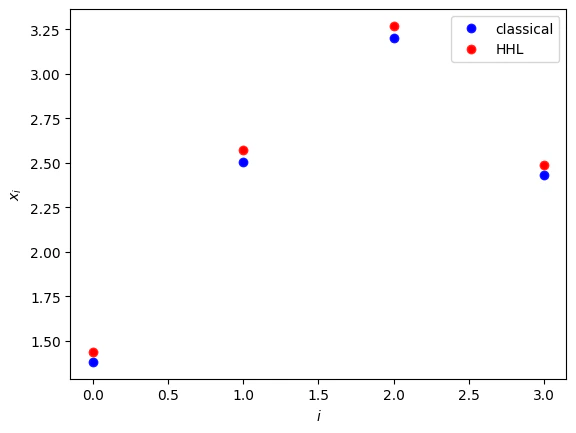
- Comparing classical and quantum solutions.
Output:
- Generalizations
- The RHS vector is normalized.
- The matrix is an Hermitian one.
- The matrix is of size .
- The eigenvalues of are in the range .
- As preprocessing, normalize and then return the normalization factor as a post-processing
- Symmetrize the problem as follows:
- Complete the matrix dimension to the closest with an identity matrix.
- If the eigenvalues of are in the range you can employ transformations to the exponentiated matrix that enters into the Hamiltonian simulation, and then undo them for extracting the results:
AmplitudeLoading function.