> ## Documentation Index
> Fetch the complete documentation index at: https://docs.classiq.io/llms.txt
> Use this file to discover all available pages before exploring further.
# Release News: June 2026
Five versions released in June. Two ways to build with AI headline the month: a Quantum Engineer plugin that brings Classiq into Claude, Cursor, and Codex, and a no-code Assistant on the platform.
A Quantum Engineer plugin for AI coding agents, and a Classiq platform assistant
GPU simulation, molecular embedding, streamlined remote execution, and more
New user guides for the AI capabilities and M2M authentication
Correctness fixes and one function removal
## AI with Classiq
Two separate AI capabilities shipped this month; if you work locally, the Quantum Engineer plugin enables your coding agent to model, synthesize, execute, and analyze quantum programs with Classiq. If you work on the platform, the Classiq Assistant turns a description into a synthesized, executable program, and answers your questions along the way.
For further reading, refer to the [Classiq blog](https://www.classiq.io/insights/classiqs-quantum-engineering-agents-now-in-your-ide-and-the-platform).
### Quantum Engineer Plugin
The plugin draws its capability from a set of **Classiq skills** paired with the **Classiq MCP**: it writes in Qmod (through the Classiq SDK), builds on validated components from the Classiq Library, and synthesizes on Classiq's backend engine to produce optimized circuits. That grounding is what lets it pull ahead on hard work, such as reproducing paper implementations, research, and multi-step applications you refine over time. The plugin is available to Classiq's enterprise customers.
For more information, including a full breakdown of the skills for each phase of quantum algorithm development, see the [Quantum Engineer Plugin](/user-guide/ai/quantum-engineer-plugin) user guide. To request access, [contact us](https://www.classiq.io/contact-us).
### Classiq Assistant (Beta)
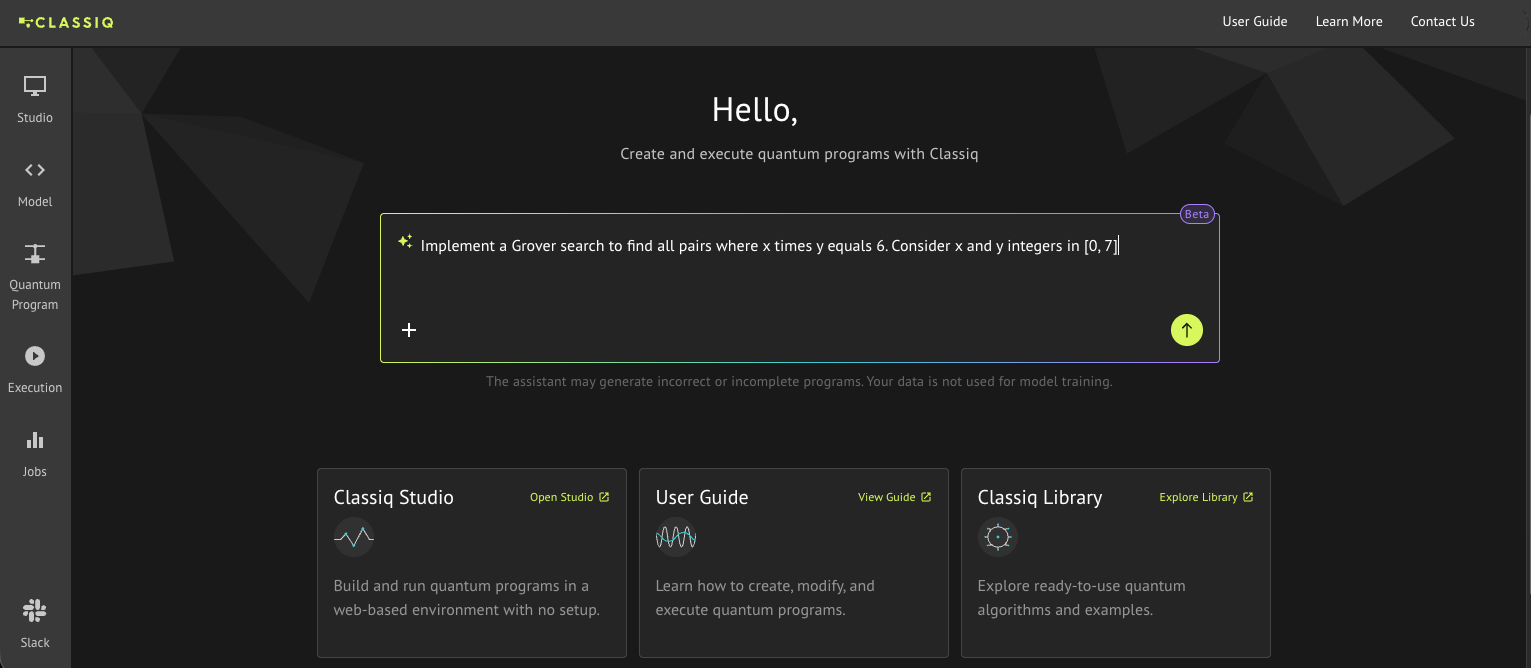
The new Classiq Assistant, built within the Classiq platform, takes you from an idea to a working quantum program. It accepts natural-language descriptions or circuit images, builds a Qmod-native model, synthesizes it, and opens the result on the Quantum Program page.
You start from the new text input box at the center of the home page, with no prior installation or configuration needed:
 From there, the assistant follows you onto the Quantum Program page, opening as a side panel:
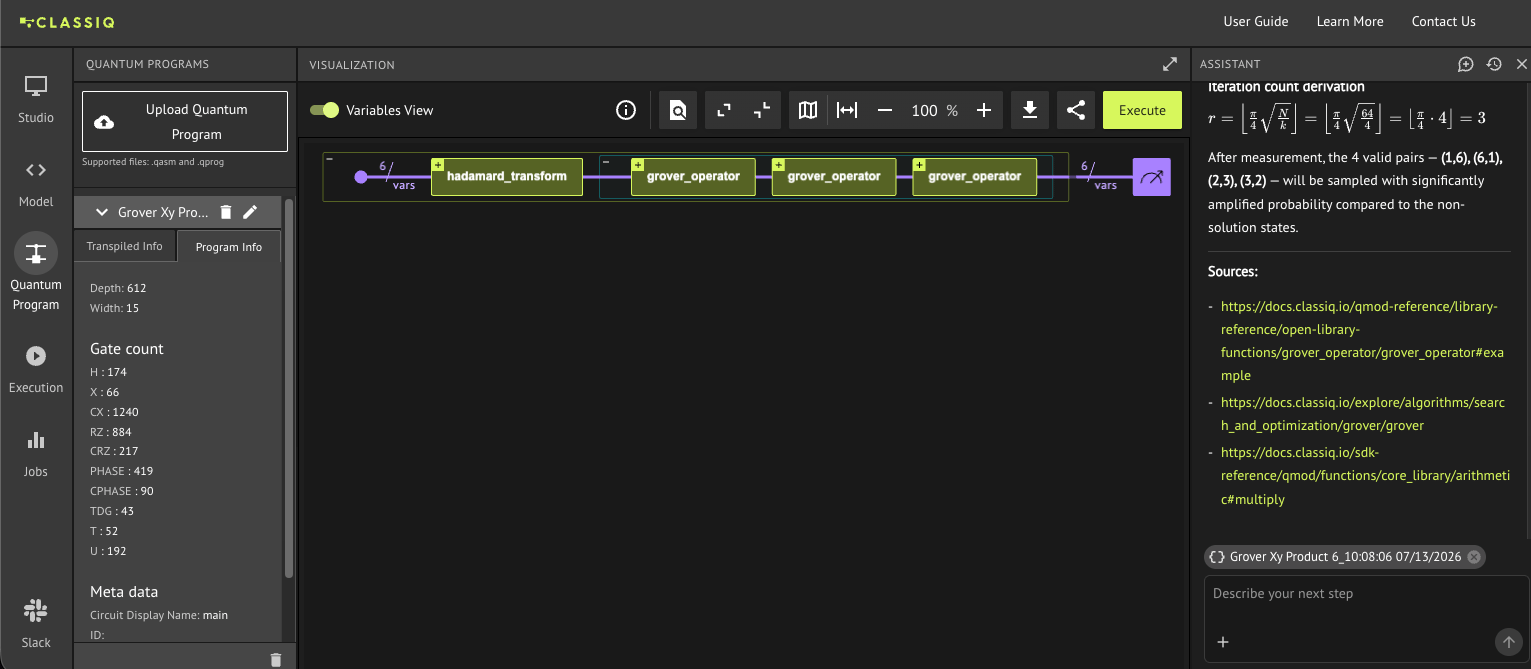 It keeps the context of your session, attaching the circuit you currently have open to the conversation, so you can ask it to explain what the program does, predict what results to expect, or refine the model, all in one continuous flow. It also answers conceptual questions about quantum computing, and a new chat starts fresh whenever you move to a different problem. When the program is ready, Execute takes it straight to a backend.
For more information, see the [Classiq Assistant](/user-guide/ai/classiq-assistant) user guide.
## Enhancements
### NVIDIA DGX Statevector Simulator
Statevector simulations can now run on a GPU-accelerated backend hosted on an NVIDIA DGX system. Selected by passing `backend="classiq/dgx_simulator"`, it handles up to **35 qubits** in single precision (float32) across both **sampling** and **statevector** modes. Exact simulation at this scale lets you validate larger algorithms, so you can catch errors in the logic before spending resources running on real hardware. Access requires specific license permissions; see [DGX Statevector Simulator](/user-guide/execution/cloud-providers/classiq-backends#dgx-statevector-simulator).
### Wavefunction-in-DFT Embedding
Simulating a full molecule at quantum accuracy quickly outgrows the qubit budget of current hardware, yet most of the chemistry that matters happens in a small, chemically active region of it. The new [`EmbeddingCalculator`](/sdk-reference/applications/chemistry#embeddingcalculator) class runs projection-based embedding to exploit exactly that: it partitions a molecular system into an active fragment, treated with a quantum algorithm such as VQE, and a surrounding environment described by DFT. The calculator drives the full DFT-and-embedding pipeline server-side and returns Hamiltonians ready to hand to a quantum solver.
A notebook walking through a complete example is coming in July.
### Streamlined Remote Execution
Two changes cut the job and queueing overhead of running on remote cloud hardware:
* **Hosted optimization on [IonQ](/user-guide/execution/cloud-providers/ionq-backends):** The [`variational_minimize`](/sdk-reference/execution#variational_minimize) variants (standalone function and `ExecutionSession` methods), used for variational algorithms such as VQE or QAOA, now accept `hosted=True` to run the entire optimization loop on IonQ Hosted Hybrid as a single Classiq execution job. Previously each optimizer iteration was submitted as its own Classiq sample job, so the job count grew with the optimization; now the SDK submits and polls that one job, while the Classiq backend handles all communication with IonQ.
Code Example:
[comment]: DO_NOT_TEST
```python theme={null}
with ExecutionSession(qprog, backend="ionq/...") as es:
result = es.variational_minimize(hamiltonian, initial_params, hosted=True)
```
Hosted mode has specific configuration requirements; see [`variational_minimize`](/sdk-reference/execution#variational_minimize) for details.
* **Persistent IBM Runtime sessions:** When you run on a remote [IBM backend](/user-guide/execution/cloud-providers/ibm-backends) inside a single [`ExecutionSession`](/user-guide/execution/ExecutionSession), successive primitives (`sample`, `observe`, `estimate_cost`, `variational_minimize`, and non-blocking counterparts) now reuse one IBM Quantum Runtime session rather than each opening its own. On busy hardware, where each session waits in the queue, keeping the session open across a multi-step workflow means you queue once instead of at every step.
No flag needed; the session reuse happens **automatically**:
[comment]: DO_NOT_TEST
```python theme={null}
with ExecutionSession(qprog, backend="ibm/...") as es:
counts = es.sample() # opens one IBM Runtime session
energy = es.observe(hamiltonian) # reuses the same session
```
### Per-Call Shot and Routing Overrides
Within an execution session, [`ExecutionSession.sample()`](/user-guide/execution/ExecutionSession#operations), `observe()`, and `variational_minimize()` (and their `submit_*` counterparts) now accept optional `num_shots` and `run_via_classiq` keyword arguments that override the session defaults for **that invocation only**. This lets the session hold your shared defaults while you vary shot counts or execution routing per primitive call.
Code Example:
[comment]: DO_NOT_TEST
```python theme={null}
with ExecutionSession(qprog, num_shots=1000) as es:
quick = es.sample() # uses the session default of 1000 shots
precise = es.sample(num_shots=8000) # overrides for this call only
```
### Visualizer Label Management
The [quantum program visualizer](/user-guide/analysis/visualization-of-quantum-programs) now keeps large circuits readable with finer control over variable labels. Previously, the same variable name repeated down every wire added visual noise that could obscure the circuit's architecture.
What has been updated:
* Adjacent repeating labels are suppressed automatically, cutting the clutter.
* A suppressed label is never lost: hover over the wire for a tooltip with the hidden name.
* A right-click context menu on each variable wire lets you show or hide individual labels as needed.
For example, a circuit with label repeats suppressed:
It keeps the context of your session, attaching the circuit you currently have open to the conversation, so you can ask it to explain what the program does, predict what results to expect, or refine the model, all in one continuous flow. It also answers conceptual questions about quantum computing, and a new chat starts fresh whenever you move to a different problem. When the program is ready, Execute takes it straight to a backend.
For more information, see the [Classiq Assistant](/user-guide/ai/classiq-assistant) user guide.
## Enhancements
### NVIDIA DGX Statevector Simulator
Statevector simulations can now run on a GPU-accelerated backend hosted on an NVIDIA DGX system. Selected by passing `backend="classiq/dgx_simulator"`, it handles up to **35 qubits** in single precision (float32) across both **sampling** and **statevector** modes. Exact simulation at this scale lets you validate larger algorithms, so you can catch errors in the logic before spending resources running on real hardware. Access requires specific license permissions; see [DGX Statevector Simulator](/user-guide/execution/cloud-providers/classiq-backends#dgx-statevector-simulator).
### Wavefunction-in-DFT Embedding
Simulating a full molecule at quantum accuracy quickly outgrows the qubit budget of current hardware, yet most of the chemistry that matters happens in a small, chemically active region of it. The new [`EmbeddingCalculator`](/sdk-reference/applications/chemistry#embeddingcalculator) class runs projection-based embedding to exploit exactly that: it partitions a molecular system into an active fragment, treated with a quantum algorithm such as VQE, and a surrounding environment described by DFT. The calculator drives the full DFT-and-embedding pipeline server-side and returns Hamiltonians ready to hand to a quantum solver.
A notebook walking through a complete example is coming in July.
### Streamlined Remote Execution
Two changes cut the job and queueing overhead of running on remote cloud hardware:
* **Hosted optimization on [IonQ](/user-guide/execution/cloud-providers/ionq-backends):** The [`variational_minimize`](/sdk-reference/execution#variational_minimize) variants (standalone function and `ExecutionSession` methods), used for variational algorithms such as VQE or QAOA, now accept `hosted=True` to run the entire optimization loop on IonQ Hosted Hybrid as a single Classiq execution job. Previously each optimizer iteration was submitted as its own Classiq sample job, so the job count grew with the optimization; now the SDK submits and polls that one job, while the Classiq backend handles all communication with IonQ.
Code Example:
[comment]: DO_NOT_TEST
```python theme={null}
with ExecutionSession(qprog, backend="ionq/...") as es:
result = es.variational_minimize(hamiltonian, initial_params, hosted=True)
```
Hosted mode has specific configuration requirements; see [`variational_minimize`](/sdk-reference/execution#variational_minimize) for details.
* **Persistent IBM Runtime sessions:** When you run on a remote [IBM backend](/user-guide/execution/cloud-providers/ibm-backends) inside a single [`ExecutionSession`](/user-guide/execution/ExecutionSession), successive primitives (`sample`, `observe`, `estimate_cost`, `variational_minimize`, and non-blocking counterparts) now reuse one IBM Quantum Runtime session rather than each opening its own. On busy hardware, where each session waits in the queue, keeping the session open across a multi-step workflow means you queue once instead of at every step.
No flag needed; the session reuse happens **automatically**:
[comment]: DO_NOT_TEST
```python theme={null}
with ExecutionSession(qprog, backend="ibm/...") as es:
counts = es.sample() # opens one IBM Runtime session
energy = es.observe(hamiltonian) # reuses the same session
```
### Per-Call Shot and Routing Overrides
Within an execution session, [`ExecutionSession.sample()`](/user-guide/execution/ExecutionSession#operations), `observe()`, and `variational_minimize()` (and their `submit_*` counterparts) now accept optional `num_shots` and `run_via_classiq` keyword arguments that override the session defaults for **that invocation only**. This lets the session hold your shared defaults while you vary shot counts or execution routing per primitive call.
Code Example:
[comment]: DO_NOT_TEST
```python theme={null}
with ExecutionSession(qprog, num_shots=1000) as es:
quick = es.sample() # uses the session default of 1000 shots
precise = es.sample(num_shots=8000) # overrides for this call only
```
### Visualizer Label Management
The [quantum program visualizer](/user-guide/analysis/visualization-of-quantum-programs) now keeps large circuits readable with finer control over variable labels. Previously, the same variable name repeated down every wire added visual noise that could obscure the circuit's architecture.
What has been updated:
* Adjacent repeating labels are suppressed automatically, cutting the clutter.
* A suppressed label is never lost: hover over the wire for a tooltip with the hidden name.
* A right-click context menu on each variable wire lets you show or hide individual labels as needed.
For example, a circuit with label repeats suppressed:
 As opposed to the previous circuit visualization:
 ### LaTeX Export for Large Circuits
LaTeX export on the Quantum Program page now also handles very large circuits, rendering them as publication-quality diagrams.
## Documentation Additions
* **[Quantum Engineer Plugin](/user-guide/ai/quantum-engineer-plugin):** Install and set up the plugin in your AI coding agent, with a breakdown of the skills for each development phase and worked examples to start from.
* **[Classiq Assistant: Getting Started](/user-guide/ai/classiq-assistant):** Access the platform assistant, generate and refine a program from a prompt, and learn the best practices for prompting it well.
* **[M2M Authentication](/user-guide/authentication/m2m-authentication):** Authenticate backend services to the Classiq platform with no human intervention required, using the non-interactive machine-to-machine flow built on the OAuth 2.0 client credentials grant.
## Bug Fixes
* **Loops and controls that reuse variables now compile correctly:** [`foreach`/`power`](/qmod-reference/language-reference/statements/classical-control-flow) loops that modified quantum-numeric variables used in later comparisons, and [`control`](/qmod-reference/language-reference/statements/control) statements whose bodies reused their condition variables, could previously produce incorrect circuits (the latter by leaking a phase onto the controlled state).
* **`subscript` now accepts a quantum expression as its index:** Indexing a [`subscript`](/qmod-reference/language-reference/expressions#path-operators) with a quantum expression (for example `res ^= subscript(table, a + b)`) previously raised an internal error; such expressions are now lowered and synthesized correctly.
* **Classical expressions can now reuse a variable:** A classical expression that reuses a variable, such as the exponent `k + k` in `power(k + k, ...)`, no longer fails with "both sides of the operation are identical"; that restriction now applies only to in-place quantum arithmetic.
* **Clearer error message when exporting parametric programs to QASM 2:** Exporting a parametric program with the default `target_language=TargetLanguage.QASM2` now raises an indicative error suggesting QASM 3, rather than an unclear internal one.
* **The visualizer stays responsive on oversized function blocks:** Running Expand All on a function block with too many child operations to render could previously freeze or crash the browser tab. It now stops with a warning that the block is too large to visualize, and the same warning appears when expanding a single oversized block.
## Deprecations
* **`exponentiation_with_depth_constraint` removed:** This function exponentiated a Pauli operator (Hamiltonian simulation) while automatically selecting Suzuki-Trotter parameters to fit a target maximum circuit depth. It has now been removed after a deprecation period. Use [`exponentiate`](/sdk-reference/qmod/functions/core_library/exponentiation) for Hamiltonian exponentiation, or the [`suzuki_trotter`](/qmod-reference/library-reference/core-library-functions/hamiltonian_evolution/suzuki_trotter/suzuki_trotter) family and [`qdrift`](/qmod-reference/library-reference/core-library-functions/hamiltonian_evolution/qdrift/qdrift) when you need explicit control over the decomposition order and repetitions.
For the technical entries behind these changes, see the [Changelog](/release-notes).
### LaTeX Export for Large Circuits
LaTeX export on the Quantum Program page now also handles very large circuits, rendering them as publication-quality diagrams.
## Documentation Additions
* **[Quantum Engineer Plugin](/user-guide/ai/quantum-engineer-plugin):** Install and set up the plugin in your AI coding agent, with a breakdown of the skills for each development phase and worked examples to start from.
* **[Classiq Assistant: Getting Started](/user-guide/ai/classiq-assistant):** Access the platform assistant, generate and refine a program from a prompt, and learn the best practices for prompting it well.
* **[M2M Authentication](/user-guide/authentication/m2m-authentication):** Authenticate backend services to the Classiq platform with no human intervention required, using the non-interactive machine-to-machine flow built on the OAuth 2.0 client credentials grant.
## Bug Fixes
* **Loops and controls that reuse variables now compile correctly:** [`foreach`/`power`](/qmod-reference/language-reference/statements/classical-control-flow) loops that modified quantum-numeric variables used in later comparisons, and [`control`](/qmod-reference/language-reference/statements/control) statements whose bodies reused their condition variables, could previously produce incorrect circuits (the latter by leaking a phase onto the controlled state).
* **`subscript` now accepts a quantum expression as its index:** Indexing a [`subscript`](/qmod-reference/language-reference/expressions#path-operators) with a quantum expression (for example `res ^= subscript(table, a + b)`) previously raised an internal error; such expressions are now lowered and synthesized correctly.
* **Classical expressions can now reuse a variable:** A classical expression that reuses a variable, such as the exponent `k + k` in `power(k + k, ...)`, no longer fails with "both sides of the operation are identical"; that restriction now applies only to in-place quantum arithmetic.
* **Clearer error message when exporting parametric programs to QASM 2:** Exporting a parametric program with the default `target_language=TargetLanguage.QASM2` now raises an indicative error suggesting QASM 3, rather than an unclear internal one.
* **The visualizer stays responsive on oversized function blocks:** Running Expand All on a function block with too many child operations to render could previously freeze or crash the browser tab. It now stops with a warning that the block is too large to visualize, and the same warning appears when expanding a single oversized block.
## Deprecations
* **`exponentiation_with_depth_constraint` removed:** This function exponentiated a Pauli operator (Hamiltonian simulation) while automatically selecting Suzuki-Trotter parameters to fit a target maximum circuit depth. It has now been removed after a deprecation period. Use [`exponentiate`](/sdk-reference/qmod/functions/core_library/exponentiation) for Hamiltonian exponentiation, or the [`suzuki_trotter`](/qmod-reference/library-reference/core-library-functions/hamiltonian_evolution/suzuki_trotter/suzuki_trotter) family and [`qdrift`](/qmod-reference/library-reference/core-library-functions/hamiltonian_evolution/qdrift/qdrift) when you need explicit control over the decomposition order and repetitions.
For the technical entries behind these changes, see the [Changelog](/release-notes).