> ## Documentation Index
> Fetch the complete documentation index at: https://docs.classiq.io/llms.txt
> Use this file to discover all available pages before exploring further.
# Release News: July 2026
Four versions released in July, led by two headline features: a new architecture that makes synthesis significantly faster, and predefined hardware benchmarking across the IDE and SDK.
A faster synthesis architecture, and predefined quantum hardware benchmarks
A new QNN layer, language ergonomics, and direct session configuration
Benchmarking and QNN guides, plus three library notebooks
Correctness fixes and API deprecations
## A Faster, Scalable Synthesis Architecture
Synthesizing Qmod code (in the IDE or via the SDK's [`synthesize`](/sdk-reference/synthesis#synthesize)) now returns a **Qmod-based executable** representation rather than a QASM circuit. This representation is a subset of Qmod: it captures the concrete implementations and resource allocations chosen for the high-level constructs in the source, while preserving the function hierarchy and symbolic control flow. Compilation is therefore **significantly faster**, cutting synthesis runtime by up to 10x, and scales better to larger problems and algorithms. The quantum program visualization is generated directly from this representation.
Transpilation no longer occurs at synthesis. To restore the old flow, in which transpilation occurs during synthesis, set `compatibility_mode=True` in the [synthesis preferences](/sdk-reference/synthesis#preferences).
### Exporting to Target Languages
After synthesizing high-level Qmod code into a concrete gate-level quantum program, the [**`export`**](/sdk-reference/synthesis#export) function, or the export menu in the Classiq IDE, transpiles it into a circuit in a target language of your choice: OpenQASM 2.0, OpenQASM 3.0, QIR, Cirq JSON, or Q#.
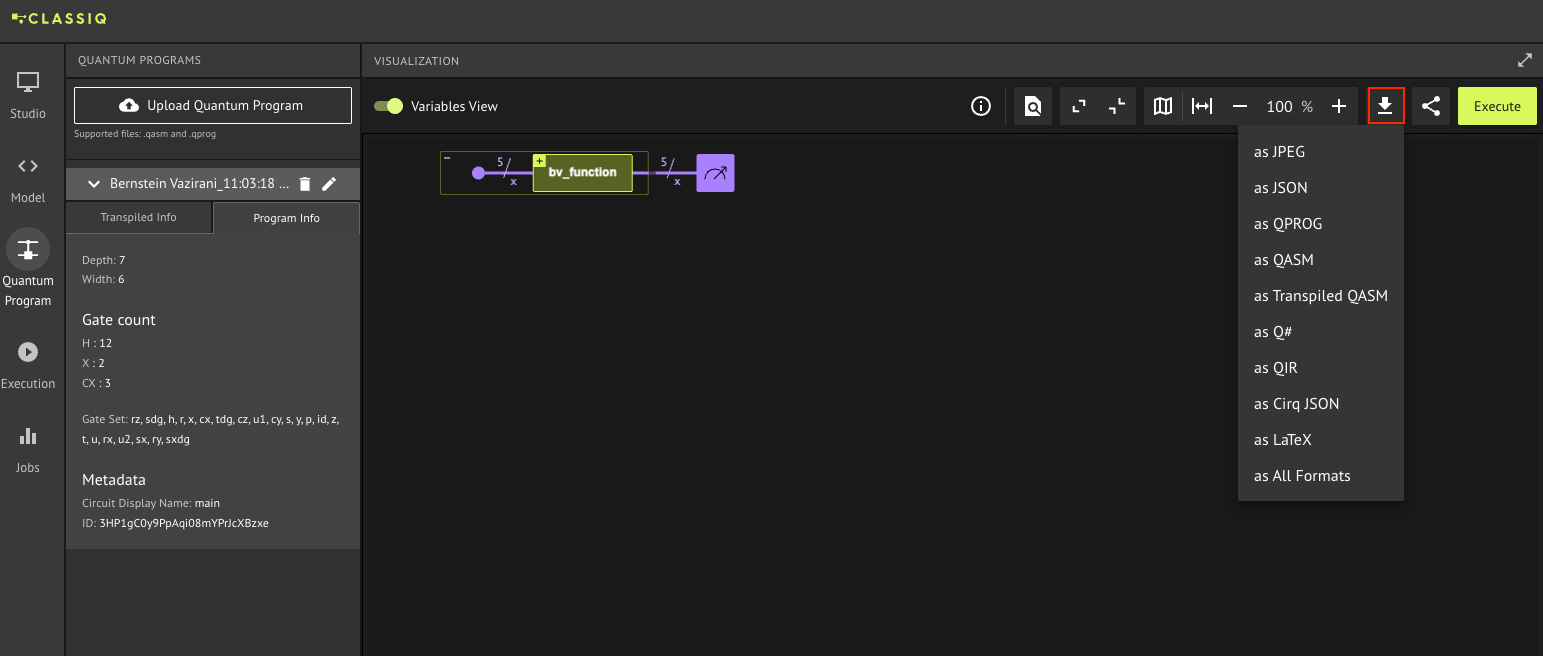 By default no further transpilation is applied; pass `transpilation_config=True` in the SDK (see example below) to reuse the transpilation level, backend, gate set, and connectivity map defined in the [synthesis preferences](/sdk-reference/synthesis#preferences), or an explicit [`TranspilationConfig`](/sdk-reference/synthesis#transpilationconfig) object to override them.
For a full explanation of transpilation and the available levels, see the [Quantum Program Transpilation](/user-guide/synthesis/quantum-program-transpilation) guide.
**Exporting a synthesized program to OpenQASM 3 with a specific gate set and connectivity:**
[comment]: DO_NOT_TEST
```python theme={null}
# synthesis preferences: a target gate set and qubit connectivity
synthesis_preferences = Preferences(
custom_hardware_settings=CustomHardwareSettings(
basis_gates=["cx", "rz", "sx", "x"],
connectivity_map=[(0, 1), (1, 2), (2, 3)],
)
)
qprog = synthesize(main, preferences=synthesis_preferences)
# transpilation_config=True reuses the gate set and connectivity from the synthesis preferences
qasm = export(qprog, target_language=TargetLanguage.QASM3, transpilation_config=True)
```
[**Execution**](/user-guide/execution/index), by contrast, transpiles the program for the backend you run on; the backend and transpilation level you set for that execution override the synthesis preferences, if there is a conflict.
### Fault-Tolerant Export
Exporting a program to a fault-tolerant circuit with a Clifford+T gate set is now **faster and more accurate**, driven by the [gridsynth](https://github.com/quantum-programming/pygridsynth) algorithm rather than the Solovay-Kitaev method used previously. Passing a [`FaultTolerantTranspilationConfig`](/sdk-reference/synthesis#faulttoleranttranspilationconfig) object to [`export`](/sdk-reference/synthesis#export) (instead of a regular [`TranspilationConfig`](/sdk-reference/synthesis#transpilationconfig)) activates fault-tolerant transpilation. Its `clifford_t_approximation_error` parameter sets the error threshold for approximating the RZ rotations into Clifford+T gates, where a lower threshold gives a more accurate but deeper circuit.
### Circuit Metrics
Two new functions now report a program's resource estimates: [`get_circuit_metrics`](/sdk-reference/synthesis#get_circuit_metrics) returns the logical width, depth, and gate counts of the Qmod-based executable, without transpilation. [`get_transpiled_circuit_metrics`](/sdk-reference/synthesis#get_transpiled_circuit_metrics) transpiles the program using the synthesis preferences first, then returns the same counts for the resulting hardware-targeted circuit.
## Hardware Benchmarking
The new hardware benchmarking suite scores how accurately a backend runs standard quantum algorithms, and lets you compare across different hardware providers. To get started, open the Execution page within the Classiq IDE and switch to the Benchmark tab, then pick one of the available [predefined benchmarks](/user-guide/execution/benchmarking/predefined-benchmarks): GHZ, Adder, QFT, State Preparation, or Dynamical Localization.
By default no further transpilation is applied; pass `transpilation_config=True` in the SDK (see example below) to reuse the transpilation level, backend, gate set, and connectivity map defined in the [synthesis preferences](/sdk-reference/synthesis#preferences), or an explicit [`TranspilationConfig`](/sdk-reference/synthesis#transpilationconfig) object to override them.
For a full explanation of transpilation and the available levels, see the [Quantum Program Transpilation](/user-guide/synthesis/quantum-program-transpilation) guide.
**Exporting a synthesized program to OpenQASM 3 with a specific gate set and connectivity:**
[comment]: DO_NOT_TEST
```python theme={null}
# synthesis preferences: a target gate set and qubit connectivity
synthesis_preferences = Preferences(
custom_hardware_settings=CustomHardwareSettings(
basis_gates=["cx", "rz", "sx", "x"],
connectivity_map=[(0, 1), (1, 2), (2, 3)],
)
)
qprog = synthesize(main, preferences=synthesis_preferences)
# transpilation_config=True reuses the gate set and connectivity from the synthesis preferences
qasm = export(qprog, target_language=TargetLanguage.QASM3, transpilation_config=True)
```
[**Execution**](/user-guide/execution/index), by contrast, transpiles the program for the backend you run on; the backend and transpilation level you set for that execution override the synthesis preferences, if there is a conflict.
### Fault-Tolerant Export
Exporting a program to a fault-tolerant circuit with a Clifford+T gate set is now **faster and more accurate**, driven by the [gridsynth](https://github.com/quantum-programming/pygridsynth) algorithm rather than the Solovay-Kitaev method used previously. Passing a [`FaultTolerantTranspilationConfig`](/sdk-reference/synthesis#faulttoleranttranspilationconfig) object to [`export`](/sdk-reference/synthesis#export) (instead of a regular [`TranspilationConfig`](/sdk-reference/synthesis#transpilationconfig)) activates fault-tolerant transpilation. Its `clifford_t_approximation_error` parameter sets the error threshold for approximating the RZ rotations into Clifford+T gates, where a lower threshold gives a more accurate but deeper circuit.
### Circuit Metrics
Two new functions now report a program's resource estimates: [`get_circuit_metrics`](/sdk-reference/synthesis#get_circuit_metrics) returns the logical width, depth, and gate counts of the Qmod-based executable, without transpilation. [`get_transpiled_circuit_metrics`](/sdk-reference/synthesis#get_transpiled_circuit_metrics) transpiles the program using the synthesis preferences first, then returns the same counts for the resulting hardware-targeted circuit.
## Hardware Benchmarking
The new hardware benchmarking suite scores how accurately a backend runs standard quantum algorithms, and lets you compare across different hardware providers. To get started, open the Execution page within the Classiq IDE and switch to the Benchmark tab, then pick one of the available [predefined benchmarks](/user-guide/execution/benchmarking/predefined-benchmarks): GHZ, Adder, QFT, State Preparation, or Dynamical Localization.
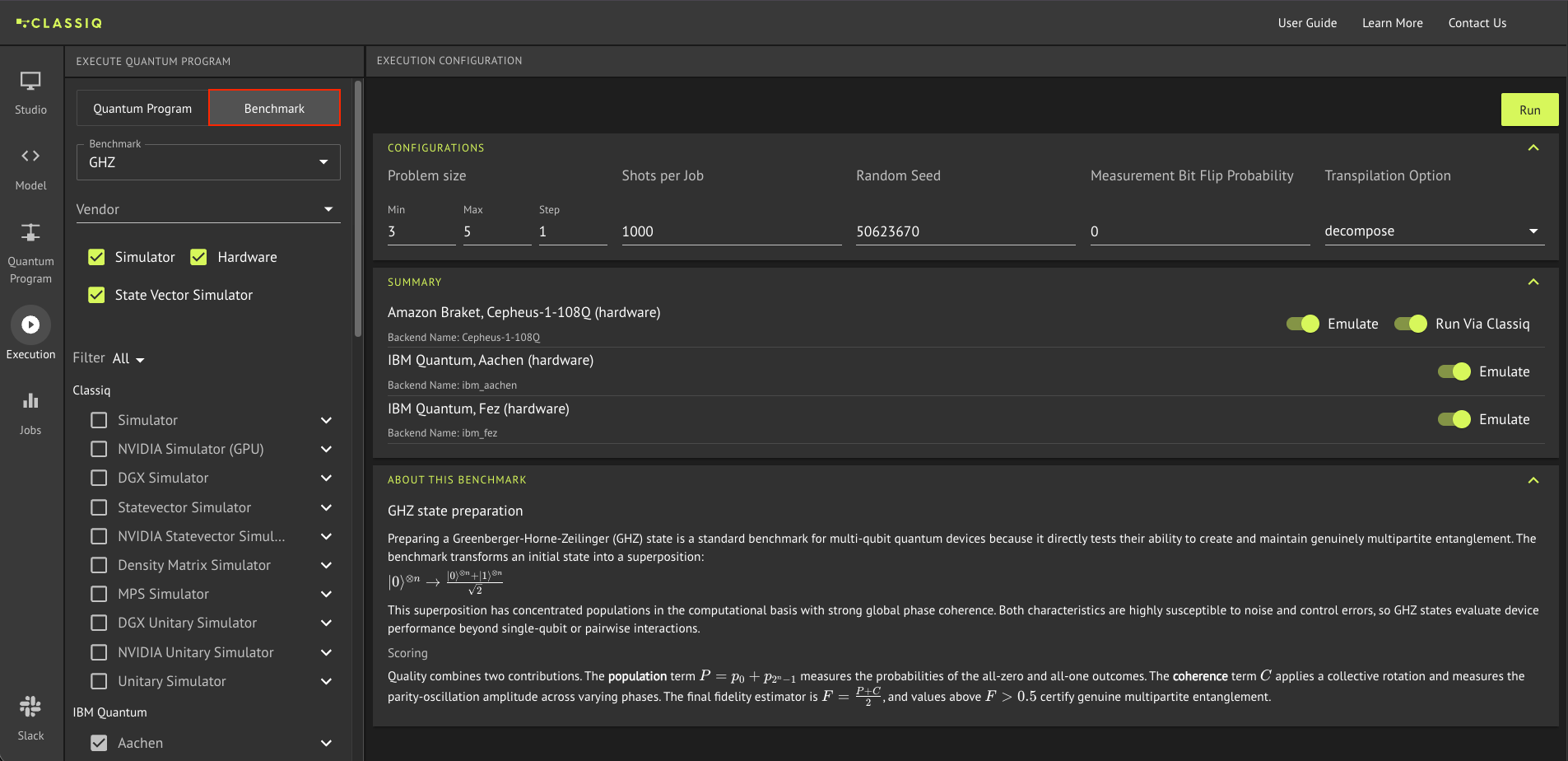 At the bottom of the page, a panel describes the benchmark you chose and explains how it is scored. Set the range of problem sizes to sweep as min / max / step, select the backends, and set the shots per job; each backend has the option to be [run via Classiq](/user-guide/execution/budget-management) on an allocated budget, so no provider credentials are needed, and to be emulated against the device's noise model instead of the physical QPU.
Up to 10 backends can be selected, spanning QPUs, hardware emulators, and simulators, and a session can include up to 15 jobs, one per backend per problem size, so the number of backends times the number of problem sizes must not exceed 15.
Click Run to submit, and the results come back as a table of backend scores by problem size and a chart plotting them all together.
At the bottom of the page, a panel describes the benchmark you chose and explains how it is scored. Set the range of problem sizes to sweep as min / max / step, select the backends, and set the shots per job; each backend has the option to be [run via Classiq](/user-guide/execution/budget-management) on an allocated budget, so no provider credentials are needed, and to be emulated against the device's noise model instead of the physical QPU.
Up to 10 backends can be selected, spanning QPUs, hardware emulators, and simulators, and a session can include up to 15 jobs, one per backend per problem size, so the number of backends times the number of problem sizes must not exceed 15.
Click Run to submit, and the results come back as a table of backend scores by problem size and a chart plotting them all together.
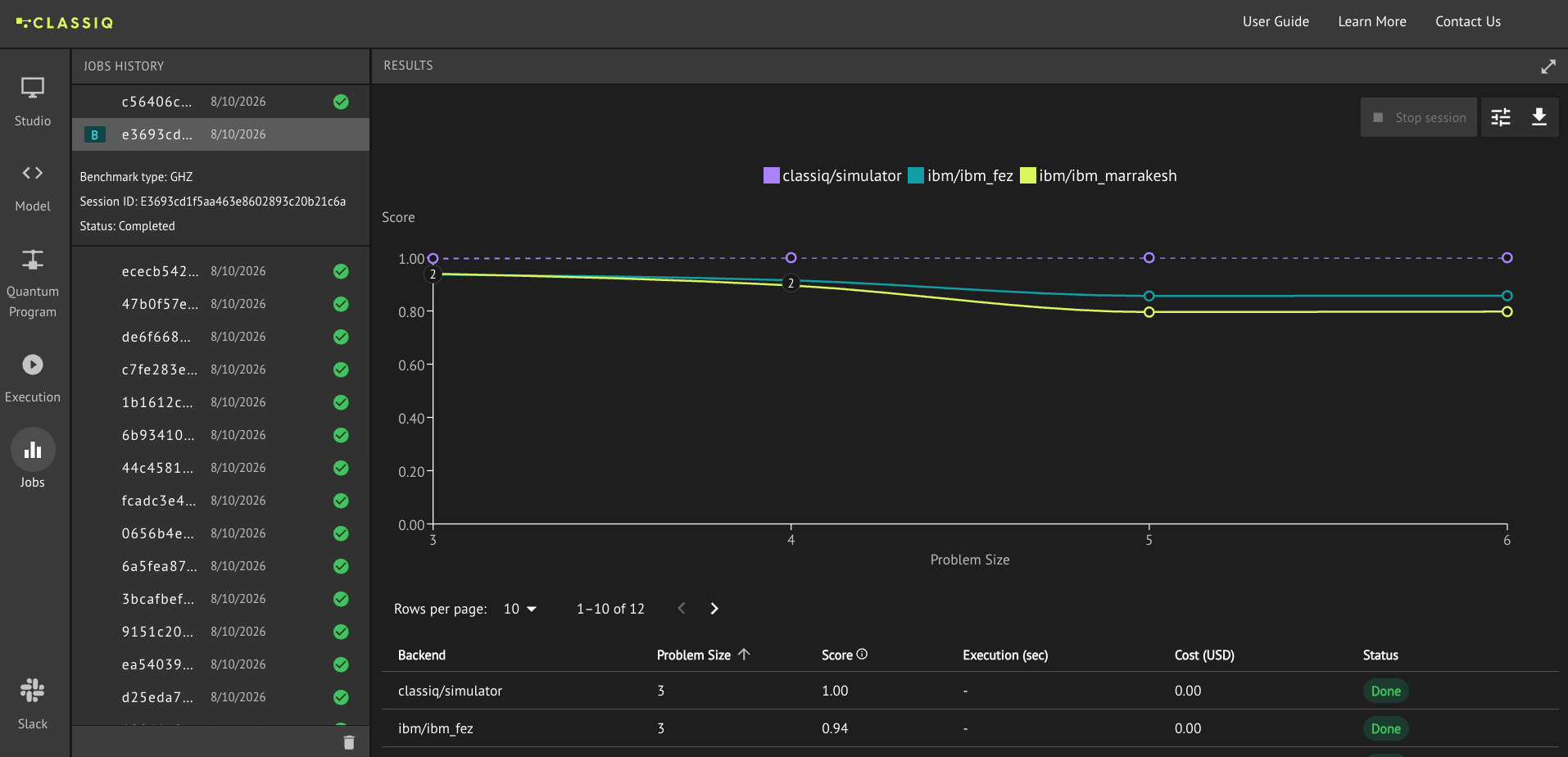 Each job receives a score between 0 and 1, where 1 means the measured outcomes match the noise-free ideal and lower values reflect hardware noise and error.
For a full walkthrough, see the [Benchmarking in the Classiq IDE](/user-guide/execution/benchmarking/predefined-benchmarks#benchmarking-in-the-classiq-ide) section of the Predefined Benchmarks user guide.
Benchmarks can also be run through the Python SDK, where [`run_benchmark`](/sdk-reference/execution#run_benchmark) takes a [`BenchmarkRequest`](/sdk-reference/execution#benchmarkrequest) and returns a [`BenchmarkSession`](/sdk-reference/execution#benchmarksession) to poll for results.
A dedicated SDK benchmarking package is on the way, adding support for custom benchmarks alongside the predefined ones. It is expected in the upcoming months.
## Enhancements
### New QLayer Interface for QNN
The new [`QLayerV2`](/user-guide/applications/qml/qnn/qlayerv2) is a cleaner, faster quantum layer for training [quantum neural networks](/user-guide/applications/qml/qnn/qnn). It accepts a synthesized quantum program and an optional list of [Pauli observables](/user-guide/modeling/observables-and-operators) (see example below), and produces a `torch` module with one output feature per observable, with no `execute` or `post_process` function to write. Its gradients use adjoint differentiation, so they are exact rather than finite-difference estimates, and training is much faster.
[comment]: DO_NOT_TEST
```python theme={null}
from classiq import Pauli
from classiq.applications.qnn import QLayerV2
layer = QLayerV2(
# a synthesized QuantumProgram
prog,
# optional observables to estimate; one output feature each (two in this case)
observables=[Pauli.Z(0), Pauli.X(1) + Pauli.Z(2)],
)
```
`QLayerV2` is set to supersede the existing [`QLayer`](/user-guide/applications/qml/qnn/qlayer) (now exported as `QLayerV1`) as the canonical interface. For a comparison and guidance on when to use each, see [Choosing between the two layers](/user-guide/applications/qml/qnn/qlayerv2#choosing-between-the-two-layers).
`QLayerV2` is Studio-only for now, with support outside Studio expected in the coming months.
### Language Ergonomics
Several small changes cut friction when writing in Qmod:
* New classical functions `range_` and `reversed_`, mirroring Python's `range` and `reversed`, are now available. They operate on Qmod classical variables within classical expressions.
* The `subscript` and `slice_` [path operators](/sdk-reference/qmod/path-operators) can now be imported directly from the top-level `classiq` package (`from classiq import *`), and no longer need an explicit import.
* Declaring a local quantum variable as a `QArray` or `QNum` now requires only its defining arguments, where a name was previously required as well.
### Direct Execution Session Configuration
Continuing the move toward flatter configuration, [`ExecutionSession`](/user-guide/execution/ExecutionSession) now accepts the advanced constructor arguments `noise_properties`, `amplitude_threshold`, `include_zero_amplitude_outputs`, and `job_name` directly, matching fields previously reachable only through [execution preferences](/sdk-reference/execution#executionpreferences).
### Backend Modality Data
The DataFrame returned by [`get_backend_details`](/user-guide/execution/index#step-2-—-inspect-available-backends) now includes a `modality` column, letting you filter and compare backends by modality when deciding where to execute your quantum program. The reported modalities are `superconducting`, `trapped-ion`, `simulator-cpu`, and `simulator-gpu`.
### Optional Execution Progress Logging
A `verbose` parameter was added to the execution functions and `ExecutionSession` methods, including [`sample`](/sdk-reference/execution#sample), [`observe`](/sdk-reference/execution#observe), [`variational_minimize`](/sdk-reference/execution#variational_minimize), and [`calculate_state_vector`](/sdk-reference/execution#calculate_state_vector). It allows the progress logging to be turned off (the "Submitting job to..." and "Job: ..." logs) by setting `verbose=False` (defaults to `True`). This is useful for repeated calls within a loop.
## Documentation Additions
* **[Hardware Benchmarking](/user-guide/execution/benchmarking) Guide:** Covering the new functional-level benchmarking suite, the different predefined benchmarks, how each is scored, and how to run them. For more information, see the [Hardware Benchmarking](#hardware-benchmarking) section above.
* **[QLayerV2](/user-guide/applications/qml/qnn/qlayerv2) Guide:** Covering the streamlined `QLayerV2` layer for hybrid QNNs, its interface and observables, worked examples, and how to choose between it and the existing [`QLayer`](/user-guide/applications/qml/qnn/qlayer). For more information, see the [New QLayer Interface for QNN](#new-qlayer-interface-for-qnn) section above.
## Library Additions
* **[Projection-Based Embedding](https://github.com/Classiq/classiq-library/blob/main/applications/chemistry/projection_based_embedding/projected_based_embedding_tutorial.ipynb):** A notebook demonstrating the [Wavefunction-in-DFT Embedding](/release-news/recap-june-2026#wavefunction-in-dft-embedding) capability added in June, putting the [`EmbeddingCalculator`](/sdk-reference/applications/chemistry#embeddingcalculator) to use on a water molecule. It treats a chemically active fragment with a quantum method such as VQE while describing the surrounding environment with DFT, then recombines the two to recover the total energy.
* **[Numerical Gradient Estimation](https://github.com/Classiq/classiq-library/blob/main/algorithms/quantum_primitives/gradient_estimation/gradient_estimation.ipynb):** Implementing Jordan's algorithm to estimate the gradient of a d-dimensional scalar function with a single quantum query, in place of the d+1 evaluations a classical finite-difference approach would require.
* **[Quantum Likelihood Estimation](https://github.com/Classiq/classiq-library/blob/main/algorithms/search_and_optimization/quantum_likelihood_estimation/quantum_likelihood_estimation.ipynb):** A hybrid algorithm for Hamiltonian learning that identifies an unknown Hamiltonian, accessible only through the time evolution it generates, from a candidate set. It implements the optimal variant, developed with the paper's authors, which jointly optimizes all five circuit parameters each iteration to make every measurement maximally informative. It converges in roughly an order of magnitude fewer experiments than standard QLE.
## Bug Fixes
* **Synthesis now catches unsafe qubit-layout changes in control-flow blocks:** reordering a quantum variable's qubits inside a `power`, `repeat`, `foreach`, or `if` block is now rejected up front with a descriptive error.
* **Classical path operators return correctly-typed results:** `subscript`, `slice_`, and `reversed_` in the Python SDK now correctly infer their result type from their argument.
* **`observe` no longer emits a spurious deprecation warning:** calling the [`observe`](/sdk-reference/execution#observe) function now runs cleanly, after previously surfacing a misplaced `submit_estimate() is deprecated` warning.
* **Quantum variable constructors reject non-string names cleanly:** passing a non-string name to `QArray`, `QNum`, `QBit`, or `QStruct` now raises a clear error, where it previously failed internally.
## Deprecations
* **`QuantumProgram.qasm` and `transpiled_circuit` deprecated:** following the synthesis architecture update, these `QuantumProgram` attributes are replaced by [`export`](/sdk-reference/synthesis#export) for a QASM circuit and [`get_circuit_metrics`](/sdk-reference/synthesis#get_circuit_metrics) or [`get_transpiled_circuit_metrics`](/sdk-reference/synthesis#get_transpiled_circuit_metrics) for resource estimation, as covered in the [synthesis architecture](#a-faster-scalable-synthesis-architecture) section above.
* **`execute_qnn` accepted observable type change:** `execute_qnn` now takes its observable as a `SparsePauliOp`; passing the deprecated `PauliOperator` is converted automatically, and emits a `DeprecationWarning`.
* **`slice` Qmod operator renamed to `slice_`:** calling `slice` now emits a deprecation warning; use `slice_` instead.
For the technical entries behind these changes, see the [Changelog](/release-notes).
Each job receives a score between 0 and 1, where 1 means the measured outcomes match the noise-free ideal and lower values reflect hardware noise and error.
For a full walkthrough, see the [Benchmarking in the Classiq IDE](/user-guide/execution/benchmarking/predefined-benchmarks#benchmarking-in-the-classiq-ide) section of the Predefined Benchmarks user guide.
Benchmarks can also be run through the Python SDK, where [`run_benchmark`](/sdk-reference/execution#run_benchmark) takes a [`BenchmarkRequest`](/sdk-reference/execution#benchmarkrequest) and returns a [`BenchmarkSession`](/sdk-reference/execution#benchmarksession) to poll for results.
A dedicated SDK benchmarking package is on the way, adding support for custom benchmarks alongside the predefined ones. It is expected in the upcoming months.
## Enhancements
### New QLayer Interface for QNN
The new [`QLayerV2`](/user-guide/applications/qml/qnn/qlayerv2) is a cleaner, faster quantum layer for training [quantum neural networks](/user-guide/applications/qml/qnn/qnn). It accepts a synthesized quantum program and an optional list of [Pauli observables](/user-guide/modeling/observables-and-operators) (see example below), and produces a `torch` module with one output feature per observable, with no `execute` or `post_process` function to write. Its gradients use adjoint differentiation, so they are exact rather than finite-difference estimates, and training is much faster.
[comment]: DO_NOT_TEST
```python theme={null}
from classiq import Pauli
from classiq.applications.qnn import QLayerV2
layer = QLayerV2(
# a synthesized QuantumProgram
prog,
# optional observables to estimate; one output feature each (two in this case)
observables=[Pauli.Z(0), Pauli.X(1) + Pauli.Z(2)],
)
```
`QLayerV2` is set to supersede the existing [`QLayer`](/user-guide/applications/qml/qnn/qlayer) (now exported as `QLayerV1`) as the canonical interface. For a comparison and guidance on when to use each, see [Choosing between the two layers](/user-guide/applications/qml/qnn/qlayerv2#choosing-between-the-two-layers).
`QLayerV2` is Studio-only for now, with support outside Studio expected in the coming months.
### Language Ergonomics
Several small changes cut friction when writing in Qmod:
* New classical functions `range_` and `reversed_`, mirroring Python's `range` and `reversed`, are now available. They operate on Qmod classical variables within classical expressions.
* The `subscript` and `slice_` [path operators](/sdk-reference/qmod/path-operators) can now be imported directly from the top-level `classiq` package (`from classiq import *`), and no longer need an explicit import.
* Declaring a local quantum variable as a `QArray` or `QNum` now requires only its defining arguments, where a name was previously required as well.
### Direct Execution Session Configuration
Continuing the move toward flatter configuration, [`ExecutionSession`](/user-guide/execution/ExecutionSession) now accepts the advanced constructor arguments `noise_properties`, `amplitude_threshold`, `include_zero_amplitude_outputs`, and `job_name` directly, matching fields previously reachable only through [execution preferences](/sdk-reference/execution#executionpreferences).
### Backend Modality Data
The DataFrame returned by [`get_backend_details`](/user-guide/execution/index#step-2-—-inspect-available-backends) now includes a `modality` column, letting you filter and compare backends by modality when deciding where to execute your quantum program. The reported modalities are `superconducting`, `trapped-ion`, `simulator-cpu`, and `simulator-gpu`.
### Optional Execution Progress Logging
A `verbose` parameter was added to the execution functions and `ExecutionSession` methods, including [`sample`](/sdk-reference/execution#sample), [`observe`](/sdk-reference/execution#observe), [`variational_minimize`](/sdk-reference/execution#variational_minimize), and [`calculate_state_vector`](/sdk-reference/execution#calculate_state_vector). It allows the progress logging to be turned off (the "Submitting job to..." and "Job: ..." logs) by setting `verbose=False` (defaults to `True`). This is useful for repeated calls within a loop.
## Documentation Additions
* **[Hardware Benchmarking](/user-guide/execution/benchmarking) Guide:** Covering the new functional-level benchmarking suite, the different predefined benchmarks, how each is scored, and how to run them. For more information, see the [Hardware Benchmarking](#hardware-benchmarking) section above.
* **[QLayerV2](/user-guide/applications/qml/qnn/qlayerv2) Guide:** Covering the streamlined `QLayerV2` layer for hybrid QNNs, its interface and observables, worked examples, and how to choose between it and the existing [`QLayer`](/user-guide/applications/qml/qnn/qlayer). For more information, see the [New QLayer Interface for QNN](#new-qlayer-interface-for-qnn) section above.
## Library Additions
* **[Projection-Based Embedding](https://github.com/Classiq/classiq-library/blob/main/applications/chemistry/projection_based_embedding/projected_based_embedding_tutorial.ipynb):** A notebook demonstrating the [Wavefunction-in-DFT Embedding](/release-news/recap-june-2026#wavefunction-in-dft-embedding) capability added in June, putting the [`EmbeddingCalculator`](/sdk-reference/applications/chemistry#embeddingcalculator) to use on a water molecule. It treats a chemically active fragment with a quantum method such as VQE while describing the surrounding environment with DFT, then recombines the two to recover the total energy.
* **[Numerical Gradient Estimation](https://github.com/Classiq/classiq-library/blob/main/algorithms/quantum_primitives/gradient_estimation/gradient_estimation.ipynb):** Implementing Jordan's algorithm to estimate the gradient of a d-dimensional scalar function with a single quantum query, in place of the d+1 evaluations a classical finite-difference approach would require.
* **[Quantum Likelihood Estimation](https://github.com/Classiq/classiq-library/blob/main/algorithms/search_and_optimization/quantum_likelihood_estimation/quantum_likelihood_estimation.ipynb):** A hybrid algorithm for Hamiltonian learning that identifies an unknown Hamiltonian, accessible only through the time evolution it generates, from a candidate set. It implements the optimal variant, developed with the paper's authors, which jointly optimizes all five circuit parameters each iteration to make every measurement maximally informative. It converges in roughly an order of magnitude fewer experiments than standard QLE.
## Bug Fixes
* **Synthesis now catches unsafe qubit-layout changes in control-flow blocks:** reordering a quantum variable's qubits inside a `power`, `repeat`, `foreach`, or `if` block is now rejected up front with a descriptive error.
* **Classical path operators return correctly-typed results:** `subscript`, `slice_`, and `reversed_` in the Python SDK now correctly infer their result type from their argument.
* **`observe` no longer emits a spurious deprecation warning:** calling the [`observe`](/sdk-reference/execution#observe) function now runs cleanly, after previously surfacing a misplaced `submit_estimate() is deprecated` warning.
* **Quantum variable constructors reject non-string names cleanly:** passing a non-string name to `QArray`, `QNum`, `QBit`, or `QStruct` now raises a clear error, where it previously failed internally.
## Deprecations
* **`QuantumProgram.qasm` and `transpiled_circuit` deprecated:** following the synthesis architecture update, these `QuantumProgram` attributes are replaced by [`export`](/sdk-reference/synthesis#export) for a QASM circuit and [`get_circuit_metrics`](/sdk-reference/synthesis#get_circuit_metrics) or [`get_transpiled_circuit_metrics`](/sdk-reference/synthesis#get_transpiled_circuit_metrics) for resource estimation, as covered in the [synthesis architecture](#a-faster-scalable-synthesis-architecture) section above.
* **`execute_qnn` accepted observable type change:** `execute_qnn` now takes its observable as a `SparsePauliOp`; passing the deprecated `PauliOperator` is converted automatically, and emits a `DeprecationWarning`.
* **`slice` Qmod operator renamed to `slice_`:** calling `slice` now emits a deprecation warning; use `slice_` instead.
For the technical entries behind these changes, see the [Changelog](/release-notes).