> ## Documentation Index
> Fetch the complete documentation index at: https://docs.classiq.io/llms.txt
> Use this file to discover all available pages before exploring further.
# Quantum Hadamard Edge Detection for Image Processing
Open this notebook in GitHub to run it yourself
Based on the paper: "Edge Detection Quantumized: A Novel Quantum Algorithm for Image Processing" [https://arxiv.org/html/2404.06889v1 ](https://arxiv.org/html/2404.06889v1)
This notebook demonstrates:
1. **QPIE (Quantum Probability Image Encoding)** encoding
2. **QHED (Quantum Hadamard Edge Detection)** algorithm
The encoding was implemented based on this paper: [https://arxiv.org/pdf/1801.01465](https://arxiv.org/pdf/1801.01465)
```python theme={null}
import math
from typing import List
import matplotlib.pyplot as plt
import numpy as np
from classiq import *
```
```python theme={null}
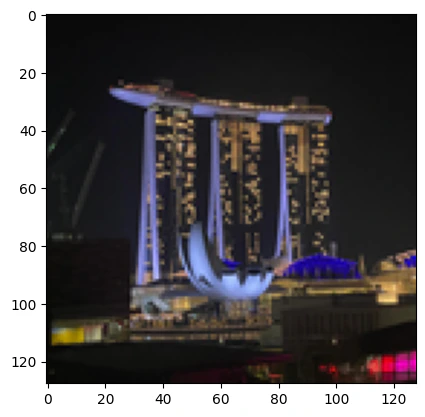
# original
photo = []
photo = plt.imread("Marina Bay Sands 128.png")
plt.imshow(photo)
```
**Output:**
```
```
 ```python theme={null}
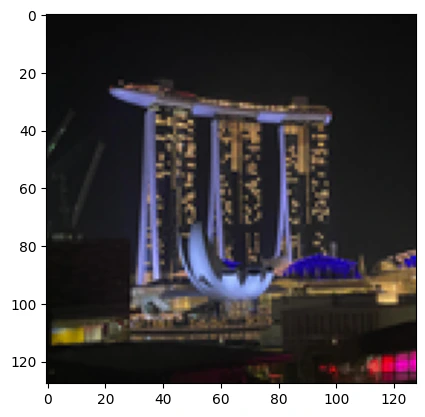
segments = [i / 255 for i in [0, 30, 60, 90, 120, 150, 180, 210, 255]]
image = np.array(photo)
# print(segments)
# print(image)
for i in range(1, len(image)):
for j in range(len(image[i])):
pixel = image[i][j][0]
for s in segments:
if pixel >= s:
image[i][j][0] = s
image[i][j][1] = s
image[i][j][2] = s
# print("AFTER THE UPDATE")
# print(image)
plt.imshow(image)
image = np.array(photo)
```
```python theme={null}
segments = [i / 255 for i in [0, 30, 60, 90, 120, 150, 180, 210, 255]]
image = np.array(photo)
# print(segments)
# print(image)
for i in range(1, len(image)):
for j in range(len(image[i])):
pixel = image[i][j][0]
for s in segments:
if pixel >= s:
image[i][j][0] = s
image[i][j][1] = s
image[i][j][2] = s
# print("AFTER THE UPDATE")
# print(image)
plt.imshow(image)
image = np.array(photo)
```
 ## QPIE Encoding Implementation
Convert an image into valid QPIE probability amplitudes.
The image is converted to grayscale if needed, made non-negative, and L2-normalized so the sum of squared values equals
1. The result is stored as an $n \times n$ array `IMAGE_DATA`.
```python theme={null}
def image_to_qpie_amplitudes(image: np.ndarray) -> np.ndarray:
"""
Convert an image to QPIE probability amplitudes as an n×n array.
|img⟩ = Σ(x,y) (I_xy / √(Σ I_xy²)) |xy⟩
"""
if len(image.shape) == 3:
image = np.mean(image, axis=2)
n = image.shape[0]
assert image.shape == (n, n), "Image must be square"
image = np.abs(image)
norm = np.sqrt(np.sum(image**2))
if norm == 0:
return np.ones((n, n)) / n
return (image / norm).T
```
```python theme={null}
IMAGE_DATA = image_to_qpie_amplitudes(image)
n = IMAGE_DATA.shape[0]
N_PIXEL_QUBITS = math.ceil(math.log2(n))
print(f"Image: {n}x{n}, pixel qubits per axis: {N_PIXEL_QUBITS}")
```
**Output:**
```
Image: 128x128, pixel qubits per axis: 7
```
```python theme={null}
print(f"Total pixels: {n*n}")
```
**Output:**
```
Total pixels: 16384
```
## Modified QHED Algorithm
We define an `ImagePixel` QStruct with separate `x` and `y` registers, and load the image via `lookup_table` — the amplitudes are computed classically from the pixel coordinates and loaded with `prepare_amplitudes`.
The QHED algorithm detects edges by:
1. Adding auxiliary qubits in $|+\rangle$ state
2. Controlled shifts of $x$ (horizontal) and $y$ (vertical) by $-1$
3. Applying Hadamard to compute differences
4. Measuring to get edge information
```python theme={null}
from classiq.qmod.symbolic import logical_or
class ImagePixel(QStruct):
x: QNum[N_PIXEL_QUBITS]
y: QNum[N_PIXEL_QUBITS]
def image_amplitude(x: float, y: float) -> float:
ix, iy = int(x), int(y)
if 0 <= ix < n and 0 <= iy < n:
return float(IMAGE_DATA[ix, iy])
return 0.0
@qfunc
def qpie_encoding(pixel: Output[ImagePixel]):
amps = lookup_table(image_amplitude, [pixel.x, pixel.y])
prepare_amplitudes(amps, 0, pixel)
@qfunc
def quantum_edge_detection_scalable(
edge_aux: Output[QBit],
pixel: Output[ImagePixel],
):
qpie_encoding(pixel=pixel)
horizontal_edge = QBit()
vertical_edge = QBit()
allocate(horizontal_edge)
allocate(vertical_edge)
within_apply(
within=lambda: H(horizontal_edge),
apply=lambda: control(horizontal_edge, lambda: inplace_add(-1, pixel.x)),
)
within_apply(
within=lambda: H(vertical_edge),
apply=lambda: control(vertical_edge, lambda: inplace_add(-1, pixel.y)),
)
edge_aux |= logical_or(horizontal_edge, vertical_edge)
drop(horizontal_edge)
drop(vertical_edge)
print(f"Creating {n}x{n} image edge detection model...")
```
**Output:**
```
Creating 128x128 image edge detection model...
```
## Synthesize and Analyze the Quantum Circuit
The model is synthesized with a 20-qubit width limit and a long timeout, and finally exported as quantum\_image\_edge\_detection with 15-digit numeric precision.
```python theme={null}
@qfunc
def main(
pixel: Output[ImagePixel],
edge_aux: Output[QBit],
):
quantum_edge_detection_scalable(edge_aux=edge_aux, pixel=pixel)
```
```python theme={null}
qprog = synthesize(
main,
constraints=Constraints(max_width=20),
preferences=Preferences(timeout_seconds=14400),
)
```
```python theme={null}
print(f"\n{n}x{n} Image Circuit Statistics:")
print(f"
- Number of qubits: {qprog.data.width}")
print(f"
- Circuit depth: {qprog.transpiled_circuit.depth}")
print(
f"
- Number of gates: {qprog.transpiled_circuit.count_ops if hasattr(qprog.transpiled_circuit, 'count_ops') else 'N/A'}"
)
```
**Output:**
```
128x128 Image Circuit Statistics:
- Number of qubits: 17
- Circuit depth: 32813
- Number of gates: {'u': 16617, 'cx': 16584}
```
```python theme={null}
show(qprog)
```
**Output:**
```
Quantum program link: https://platform.classiq.io/circuit/3AlGcDNufmf2h6AwpUBoej5fGk8
```
```python theme={null}
qprog = set_quantum_program_execution_preferences(
qprog, preferences=ExecutionPreferences(num_shots=200000)
)
res = execute(qprog).result()[0].value
res.dataframe
```
## QPIE Encoding Implementation
Convert an image into valid QPIE probability amplitudes.
The image is converted to grayscale if needed, made non-negative, and L2-normalized so the sum of squared values equals
1. The result is stored as an $n \times n$ array `IMAGE_DATA`.
```python theme={null}
def image_to_qpie_amplitudes(image: np.ndarray) -> np.ndarray:
"""
Convert an image to QPIE probability amplitudes as an n×n array.
|img⟩ = Σ(x,y) (I_xy / √(Σ I_xy²)) |xy⟩
"""
if len(image.shape) == 3:
image = np.mean(image, axis=2)
n = image.shape[0]
assert image.shape == (n, n), "Image must be square"
image = np.abs(image)
norm = np.sqrt(np.sum(image**2))
if norm == 0:
return np.ones((n, n)) / n
return (image / norm).T
```
```python theme={null}
IMAGE_DATA = image_to_qpie_amplitudes(image)
n = IMAGE_DATA.shape[0]
N_PIXEL_QUBITS = math.ceil(math.log2(n))
print(f"Image: {n}x{n}, pixel qubits per axis: {N_PIXEL_QUBITS}")
```
**Output:**
```
Image: 128x128, pixel qubits per axis: 7
```
```python theme={null}
print(f"Total pixels: {n*n}")
```
**Output:**
```
Total pixels: 16384
```
## Modified QHED Algorithm
We define an `ImagePixel` QStruct with separate `x` and `y` registers, and load the image via `lookup_table` — the amplitudes are computed classically from the pixel coordinates and loaded with `prepare_amplitudes`.
The QHED algorithm detects edges by:
1. Adding auxiliary qubits in $|+\rangle$ state
2. Controlled shifts of $x$ (horizontal) and $y$ (vertical) by $-1$
3. Applying Hadamard to compute differences
4. Measuring to get edge information
```python theme={null}
from classiq.qmod.symbolic import logical_or
class ImagePixel(QStruct):
x: QNum[N_PIXEL_QUBITS]
y: QNum[N_PIXEL_QUBITS]
def image_amplitude(x: float, y: float) -> float:
ix, iy = int(x), int(y)
if 0 <= ix < n and 0 <= iy < n:
return float(IMAGE_DATA[ix, iy])
return 0.0
@qfunc
def qpie_encoding(pixel: Output[ImagePixel]):
amps = lookup_table(image_amplitude, [pixel.x, pixel.y])
prepare_amplitudes(amps, 0, pixel)
@qfunc
def quantum_edge_detection_scalable(
edge_aux: Output[QBit],
pixel: Output[ImagePixel],
):
qpie_encoding(pixel=pixel)
horizontal_edge = QBit()
vertical_edge = QBit()
allocate(horizontal_edge)
allocate(vertical_edge)
within_apply(
within=lambda: H(horizontal_edge),
apply=lambda: control(horizontal_edge, lambda: inplace_add(-1, pixel.x)),
)
within_apply(
within=lambda: H(vertical_edge),
apply=lambda: control(vertical_edge, lambda: inplace_add(-1, pixel.y)),
)
edge_aux |= logical_or(horizontal_edge, vertical_edge)
drop(horizontal_edge)
drop(vertical_edge)
print(f"Creating {n}x{n} image edge detection model...")
```
**Output:**
```
Creating 128x128 image edge detection model...
```
## Synthesize and Analyze the Quantum Circuit
The model is synthesized with a 20-qubit width limit and a long timeout, and finally exported as quantum\_image\_edge\_detection with 15-digit numeric precision.
```python theme={null}
@qfunc
def main(
pixel: Output[ImagePixel],
edge_aux: Output[QBit],
):
quantum_edge_detection_scalable(edge_aux=edge_aux, pixel=pixel)
```
```python theme={null}
qprog = synthesize(
main,
constraints=Constraints(max_width=20),
preferences=Preferences(timeout_seconds=14400),
)
```
```python theme={null}
print(f"\n{n}x{n} Image Circuit Statistics:")
print(f"
- Number of qubits: {qprog.data.width}")
print(f"
- Circuit depth: {qprog.transpiled_circuit.depth}")
print(
f"
- Number of gates: {qprog.transpiled_circuit.count_ops if hasattr(qprog.transpiled_circuit, 'count_ops') else 'N/A'}"
)
```
**Output:**
```
128x128 Image Circuit Statistics:
- Number of qubits: 17
- Circuit depth: 32813
- Number of gates: {'u': 16617, 'cx': 16584}
```
```python theme={null}
show(qprog)
```
**Output:**
```
Quantum program link: https://platform.classiq.io/circuit/3AlGcDNufmf2h6AwpUBoej5fGk8
```
```python theme={null}
qprog = set_quantum_program_execution_preferences(
qprog, preferences=ExecutionPreferences(num_shots=200000)
)
res = execute(qprog).result()[0].value
res.dataframe
```
| pixel.x | pixel.y | edge\_aux | counts | probability | bitstring |
| 0 | 64 | 92 | 0 | 167 | 0.000835 | 010111001000000 |
| 1 | 37 | 89 | 0 | 165 | 0.000825 | 010110010100101 |
| 2 | 64 | 91 | 0 | 163 | 0.000815 | 010110111000000 |
| 3 | 62 | 91 | 0 | 161 | 0.000805 | 010110110111110 |
| 4 | 70 | 95 | 0 | 158 | 0.000790 | 010111111000110 |
| ... | ... | ... | ... | ... | ... | ... |
| 17277 | 115 | 127 | 1 | 1 | 0.000005 | 111111111110011 |
| 17278 | 118 | 127 | 1 | 1 | 0.000005 | 111111111110110 |
| 17279 | 119 | 127 | 1 | 1 | 0.000005 | 111111111110111 |
| 17280 | 120 | 127 | 1 | 1 | 0.000005 | 111111111111000 |
| 17281 | 122 | 127 | 1 | 1 | 0.000005 | 111111111111010 |
17282 rows × 6 columns
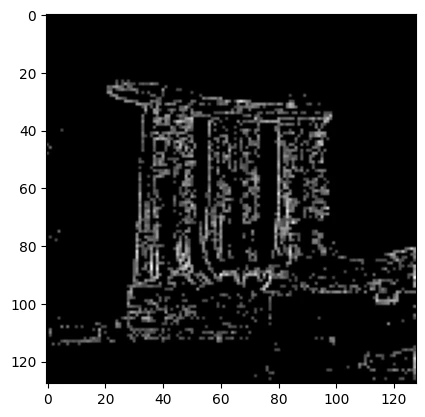
## Create Edge Image From Measurement Results
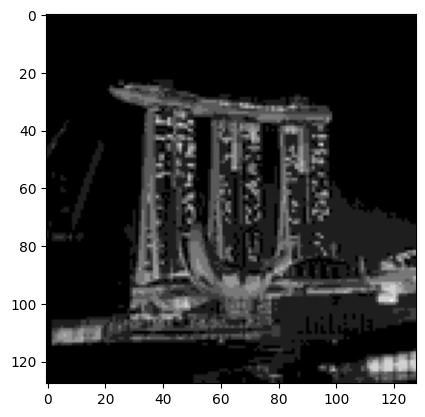
If `edge_aux == 1` then it is marked as an edge pixel.
The new amplitude is calculated based on the number of shots measured for that pixel, normalized by the total number of shots.
```python theme={null}
df = res.dataframe
edge_df = df[df["edge_aux"] == 1]
edge_image = np.zeros((n, n))
for _, row in edge_df.iterrows():
edge_image[int(row["pixel.x"]), int(row["pixel.y"])] = np.sqrt(row["probability"])
```
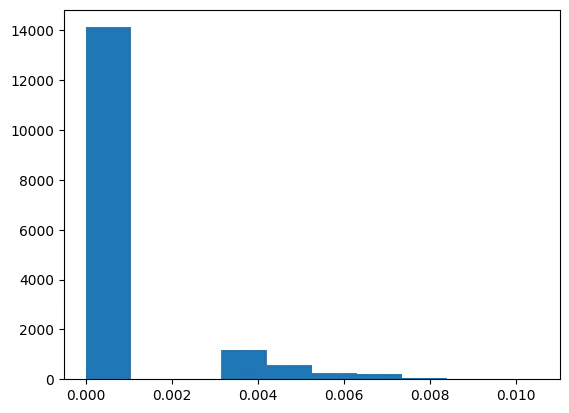
Analyze amplitude distributions
```python theme={null}
plt.hist(edge_image.flatten())
```
**Output:**
```
(array([1.2776e+04, 0.0000e+00, 1.3470e+03, 1.1560e+03, 5.5400e+02,
2.6500e+02, 2.0400e+02, 6.4000e+01, 9.0000e+00, 9.0000e+00]),
array([
0. , 0.00104881, 0.00209762, 0.00314643, 0.00419524,
0.00524404, 0.00629285, 0.00734166, 0.00839047, 0.00943928,
0.01048809]),
)
```
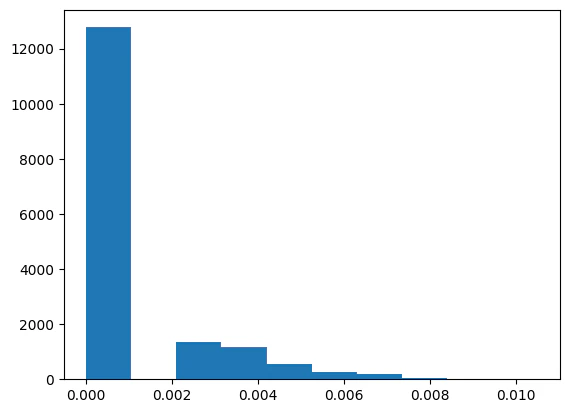 Some amplitudes are extremely small and can be treated as noise; discarding them yields a cleaner edge image.
```python theme={null}
edge_image = np.where(edge_image > 0.003, edge_image, 0)
plt.hist(edge_image.flatten())
```
**Output:**
```
(array([1.4123e+04, 0.0000e+00, 0.0000e+00, 1.1560e+03, 5.5400e+02,
2.6500e+02, 2.0400e+02, 6.4000e+01, 9.0000e+00, 9.0000e+00]),
array([
0. , 0.00104881, 0.00209762, 0.00314643, 0.00419524,
0.00524404, 0.00629285, 0.00734166, 0.00839047, 0.00943928,
0.01048809]),
)
```
Some amplitudes are extremely small and can be treated as noise; discarding them yields a cleaner edge image.
```python theme={null}
edge_image = np.where(edge_image > 0.003, edge_image, 0)
plt.hist(edge_image.flatten())
```
**Output:**
```
(array([1.4123e+04, 0.0000e+00, 0.0000e+00, 1.1560e+03, 5.5400e+02,
2.6500e+02, 2.0400e+02, 6.4000e+01, 9.0000e+00, 9.0000e+00]),
array([
0. , 0.00104881, 0.00209762, 0.00314643, 0.00419524,
0.00524404, 0.00629285, 0.00734166, 0.00839047, 0.00943928,
0.01048809]),
)
```
 The resulting edge-detected image
```python theme={null}
plt.imshow(edge_image.T, cmap="gray")
```
**Output:**
```
```
The resulting edge-detected image
```python theme={null}
plt.imshow(edge_image.T, cmap="gray")
```
**Output:**
```
```
 In comparison, the original image is:
```python theme={null}
plt.imshow(image)
```
**Output:**
```
```
In comparison, the original image is:
```python theme={null}
plt.imshow(image)
```
**Output:**
```
```